Live preview · Sound Crystal
See your sound.
Turn the sound around you into light and motion.
Uses your microphone · audio never leaves your device
LAeqEstimated
—dB(A)
Not a certified sound level meter. Until calibrated, readings are estimates and can be off by several dB.
Measurement Setup
Two devices, better results
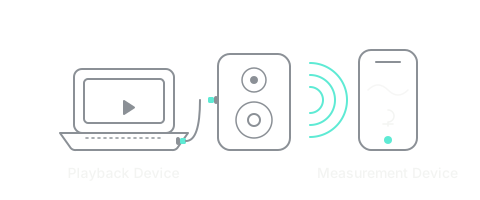
Device Role
How it works
Open Sound Canvas on the playback device.
Place this device at the listening position.
Press Start Sweep Measurement.
Playback Mode
This device will play the sweep sound.
Open Sound Canvas on another device. Select Measurement Device.
Playing sweep…
Step 1 of 6
What are you measuring?
Step 2 of 6
Set up your space
- Place the speaker facing you
- Place your phone directly in front of it
- Set the distance below
Step 3 of 6
Checking your room
—
Start listening to check background noise
Step 4 of 6
Room Check
Initializing microphone…
Unable to start microphone.
Please allow microphone access to continue.
Measurement Calibration
Floor Noise
Keep the room quiet.
✓ Floor Noise Calibrated
Noise Floor
— dB
Preparing…
- Room Noise Waiting…
- Microphone Waiting…
- Move closer to the speaker.
- Ready Waiting…
Checking…
Ready to Measure
Ready. Place the microphone at the listening position. Press Start Sweep Measurement.
Step 5 of 6
Unable to prepare audio playback.
Tap Retry.
Preparing…
Recording…
Step 6 of 6
Results
Analyzing…
Measurement Quality
Room / Placement View
-
Direct Sound 0–5ms
-
Early Reflection 5–20ms
-
Late Reflection 20ms+
Room Guide
Recommendations